Thursday, March 29, 2012

Making the Android Developer Console work for your whole team

[This post is by Ellie Powers, a product manager on the Google Play team. — Tim Bray]

As your apps have gotten more successful, more people have joined your team. Today, we’re making it easier to work together on analyzing and managing your published Android apps. Sharing passwords is generally a bad idea; so as of now, there’s no need to do that for the Android Developer Console — everyone can use his or her own Google account.


The account that you use today to sign into the Android Developer Console will become the account owner; only the account owner can manage access to the Console. The account owner can email an invitation to anyone; when they accept it, they’ll need to use a Google account to sign in.


Different people in your team do different jobs, so when you invite someone to your Android Developer Console, you’ll be able to specify what access they need. Today, you can limit access per-user to financial reports. In the future, we’ll give you more fine-grained control over access to the Console. For details, see Account owner and user access.


We hope this helps your team collaborate more easily. If you have any issues, feel free to get in touch via the Developer Help Center.


Join the discussion on

+Android Developers


You have read this article with the title . You can bookmark this page URL https://azaquery.blogspot.com/2012/03/making-android-developer-console-work_29.html. Thanks!
Sunday, March 25, 2012

Your demand has good correlation record for reference.

My request was pretty simple:
Could you make the GO Power Master battery icon the default battery icon, or enable the icon to be swapped with a setting? 
It its much better than the battery indicator in the right hand side of the notification blind. 
Also, is it possible to enable a setting where we can prevent the Power Master app from displaying in the notification blind? 
Keep up the great work! 
@jaredmorgs
The response I got back was something I had to read over a number of times to understand.
Hello, your demand has good correlation record for reference, in addition, notification bar the icon of the hidden in setting off TongZhiLan operation interface displays options can, thank you
Before I continue, I want to thank the GoLauncher team for:
  1. Responding.
  2. Offering a top quality Android launcher for free, and releasing fixes and updates weekly (!!).
Lets break it down as far as I can understand:
Hello, your demand has good correlation record for reference,
I think this means "the information you provided about the battery status icon will be useful for future product enhancements and feature inclusions".
in addition, notification bar the icon of the hidden in setting off TongZhiLan operation interface displays options can

I have since verified this to mean: "you can remove the Power Master app from the Android Notification blind by adjusting the settings in the Go Power Master application directly."

Something clearly got lost in translation. 

This interaction shows that if you give native English speakers enough keyword information, they can usually interpret what non-native English speakers are trying to say.


You have read this article Bug / GoLauncher / Translation with the title . You can bookmark this page URL https://azaquery.blogspot.com/2012/03/your-demand-has-good-correlation-record.html. Thanks!
Thursday, March 22, 2012

New Sales Reports on Google Play


[This post is by Debashish Chatterjee, Krishna Atkuru, and Ellie Powers of the Google Play Publisher Site team. —Dirk Dougherty]


For app publishers, complete and timely sales reporting is incredibly useful for managing a business on Google Play. Today we are introducing a new financial tool — Estimated Sales Reports — to give you visibility over ongoing product sales and help you support customers between payout cycles.


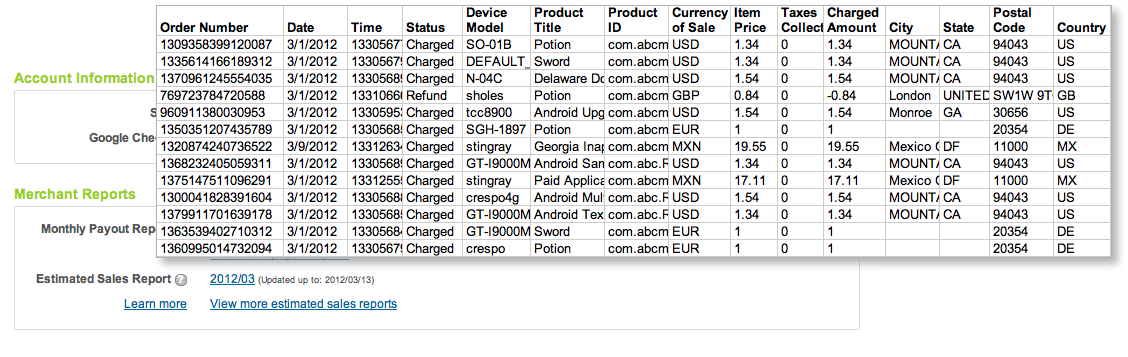
The new sales reports show you complete transaction details of recent sales and refunds for all products in your developer account, including both in-app products and paid apps. Each report is a cumulative for the current payout period, updated nightly with the details of recent transactions. As customers complete purchases and their accounts are charged (or refunds are applied), the new transaction details are appended to the Estimated Sales Report. Depending on account timezone differences, transactions appear on the estimated sales report within 2 days of completion. Finally, at the close of the monthly payout cycle, the current Estimated Sales Report is archived and a new report is created for the next cycle.


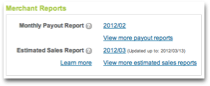
You can access current or past sales reports from the “Merchant Reports” section of the Developer Console. The Estimated Sales Reports are downloadable CSV (comma-separated values) files, so you can analyze the data using any tools you choose, in the same way as you've been doing for payout reports. The sales reports list the same details as payout reports — buyer and order, product, device information, amount, currency of sale, and more — except without final payment details. This makes it easier for you to reconcile recorded sales against your actual payouts. Estimated sales reports are available with data starting February 1, 2012.


We’ve also taken this opportunity to rename our existing “Merchant Sales Reports” to Monthly Payout Reports, to better reflect their content.


Together with the application statistics introduced last month, the Estimated Sales and Monthly Payout Reports give you a more complete view of your products’ download and sales activity over time. We hope you’ll find them useful. As always, please feel free to give us feedback through the Developer Help Center.


Join the discussion on

+Android Developers


You have read this article Google Play with the title . You can bookmark this page URL https://azaquery.blogspot.com/2012/03/new-sales-reports-on-google-play_22.html. Thanks!